
What's new

Software Updating while in Drive

AI says; VEHICLE - SETTINGS - VERSION....but I haven't tried it yet. It's a little different from Uconnect 4.
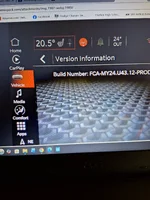
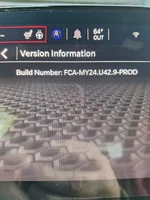
This is what I see…Build Number

IMG_1987.webp
 
This is what I see…Build Number

View attachment 1989
Thanks for sharing the version number! Looks like I'm still on an older version. (U41.18) I can't get it to update for the life of me. It connects to my home wifi just fine.

I'm guessing the update goes out in waves but mine is an older car and it's been a while...
 
Thanks for sharing the version number! Looks like I'm still on an older version. (U41.18) I can't get it to update for the life of me. It connects to my home wifi just fine.

I'm guessing the update goes out in waves but mine is an older car and it's been a while...
or maybe while driving... :LOL:
 
I can NOT find the version tab! Can someone with a US car look to find this for us? Thanks!
I'm definitely in the US. In the settings menu, on the left hand side there's a box that says "system information" near the bottom. You gotta scroll down.
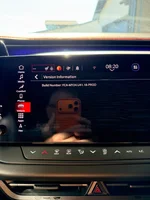
Tap on that, then on the right you should have two menu options. One of those options is "Version Information" and tapping that will take you to the build number screen that New Yorker shared.

Also for what it's worth I don't think there are regional software differences on the 2026 car.
 
Also for what it's worth I don't think there are regional software differences on the 2026 car.
Correcto!


To clarify, Military AutoSource vehicles are built to US specifications (FMVSS standards). They are not regional-market vehicles. They are manufactured for the U.S. market and sold tax-free to eligible U.S. military, DoD civilians, and authorized personnel under the Status of Forces Agreement (SOFA).

This means the vehicle retains U.S. lighting, emissions, safety equipment, software, and other factory specifications.
 
BRB.............. FINALLY, thanks. The good news is that I found it, the bad news it's older than yours.

20260820_090012.webp

20260821_073548.webp
 
I have not seen this on my Sixpack yet, but my wife's '26 Pacifica installed the same update about a week ago. It happened when I parked after a long drive. No warning as others have said, and I did not see an option to cancel or update later. Definitely NOT downloaded over Wifi since that option is turned off, and, I've never paired it with any networks.
 
📢 Support the above vendors that support this site!
To become a Supporting Vendor: ✉️ Message Dragoon

Trending Topics

Back
Top Bottom